
5D attributes and getting attribute volumes from CAD (BIM)
22 February 2024
QTO grouping of attributes of structured CAD (BIM) data
22 February 2024

QTO Quantity Take-Off: attribute grouping of data

Quantity of materials (QTO) calculation in construction is the process of obtaining attributes of the quantity and volume of resources required for a construction project. For each group of items, an individual volume attribute must be selected - quantity attribute, length attribute (meters), area attribute (square meters) or volume attribute (cubic meters).


In addition, each group of creatures has its own refining factors that help you get the actual volume, not just a geometrically based one. These features of each group are what the QTO process takes into account.

The Quantity Take-Off (QTO) process is necessary to produce accurate costings and precise estimates, preventing over- or under-ordering of materials.

As an example, let's select a category of wall elements from a Revit® or IFC CAD (BIM) project, group the entities in that category by wall type, and sum the volumes for each type to represent the result as a QTO volume attribute table. A schematic representation of this process is shown in the following image.
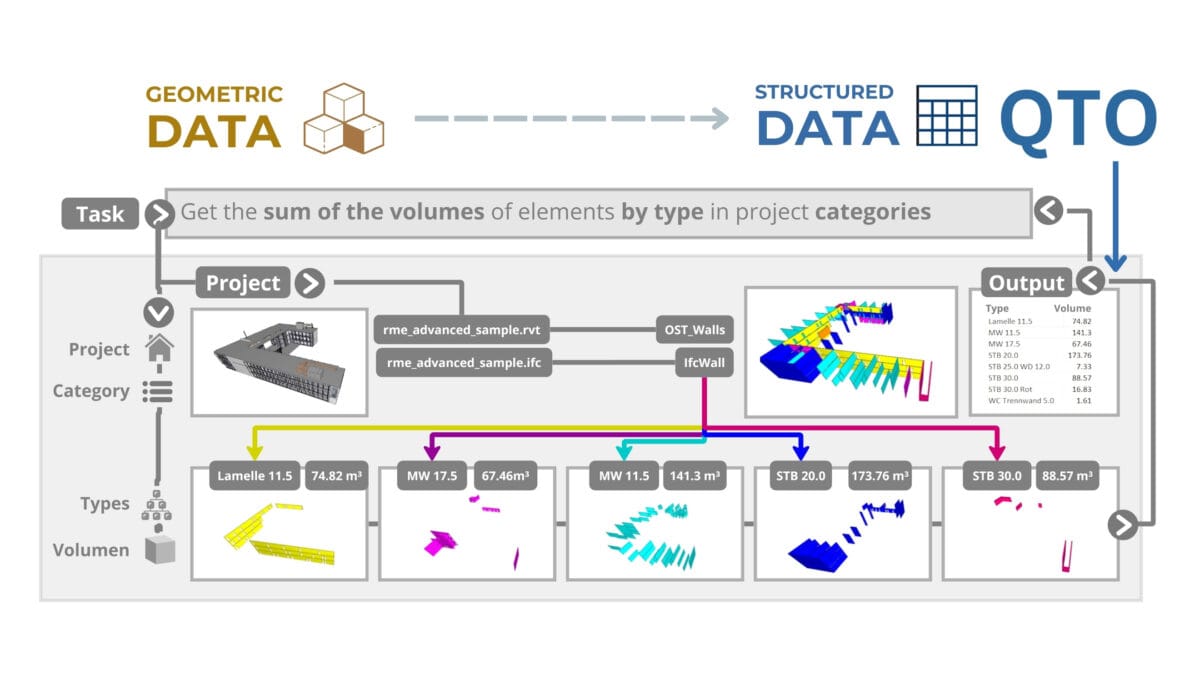
In the example of this typical project (Figure 3.2-3), all the creature elements of the wall category are grouped by wall type, e.g. "Lamelle 11.5", "MW 11.5" and "STB 20.0", and have well-defined volume attributes represented in metric cubes. Our task is to learn how to automatically produce a table of volume attributes for all types in a wall category in any project.

Gone are the days when experienced foremens and estimators armed themselves with a ruler and protractor, carefully measuring every line on paper or PDF plans, a tradition that has not changed over the past millennia. With the development of 3D modeling, where the geometry of each element is now directly related to its automatically calculated volume attribute, the QTO process has become automated.

Specifically in our example, the task is to "select a wall category in the project, group all elements by type, and present volume attribute information in a tabular format".

Due to the closed nature of CAD (BIM) data, not every professional today can use direct access to structured data inside a CAD (BIM) program (more about this in the chapter "BIM-BOM concept"). Therefore, many people have to turn to tools based on the concepts of open-BIM and closedBIM, which are developed and promoted by CAD (BIM) program manufacturers.

Creating a table with volume attributes from CAD (BIM) projects using today's popular open-BIM libraries such as IFC.js for JavaScript would require about 150 lines of code, while using IfcOpenShell (open-BIM) or IronPython (closedBIM) would reduce automation code to 40 lines. When working with specialized user interface tools such as Solibr® or creating a table directly in Revit®, identical tabular attribute results are achieved in 17 button clicks.

With open-BIM and closedBIM tools, regardless of the amount of code written or the number of button clicks, it is possible to get the same volume table for groups of elements from a CAD (BIM) project. There are hundreds of different tools on the market today that can produce similar results.
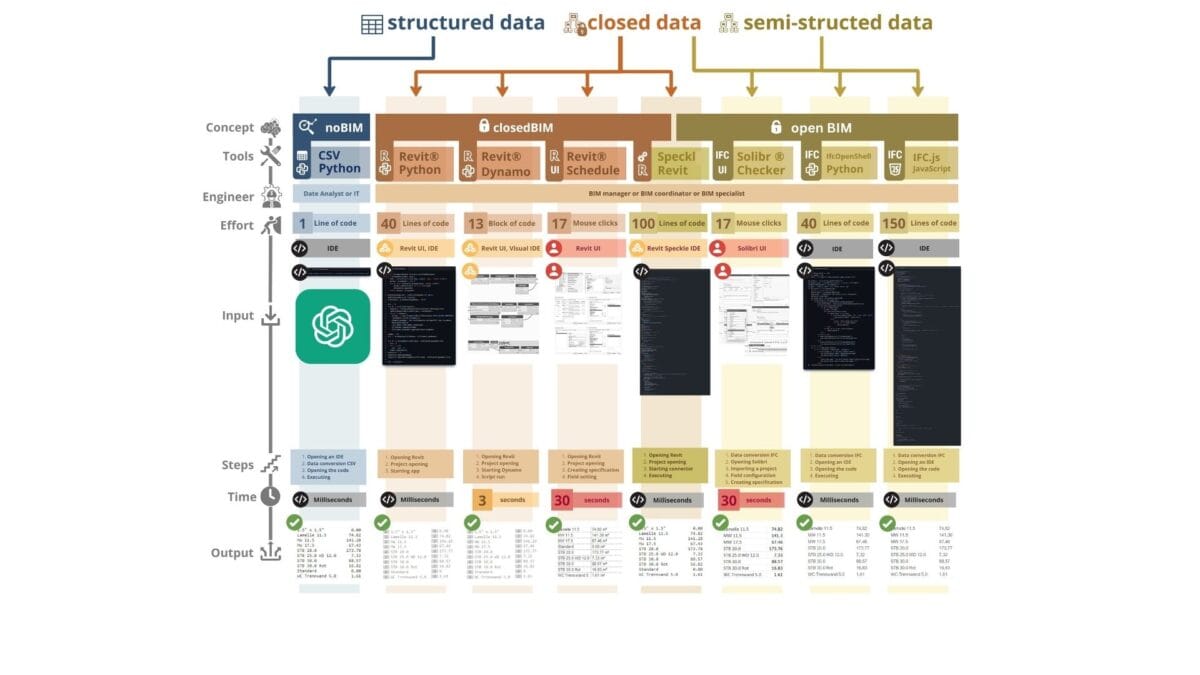
Unfortunately, the native form in which raw CAD (BIM) data is stored does not allow it to be quickly manipulated openly, forcing users to work with open-BIM and closedBIM tools.

Leave a Reply

Change language

Post's Highlights

Stay updated: news and insights


We’re Here to Help

Fresh solutions are released through our social channels

UNLOCK THE POWER OF DATA
 IN CONSTRUCTION

Dive into the world of data-driven construction with this accessible guide, perfect for professionals and novices alike.
From the basics of data management to cutting-edge trends in digital transformation, this book
will be your comprehensive guide to using data in the construction industry.

Related posts 

Focus Areas

Search

Search
Sorry, no articles found.

Don't miss the new solutions


Linux

macOS

Looking for the Linux or MAC version? Send us a quick message using the button below, and we’ll guide you through the process!


📥 Download OnePager

Welcome to DataDrivenConstruction—where data meets innovation in the construction industry. Our One-Pager offers a concise overview of how our data-driven solutions can transform your projects, enhance efficiency, and drive sustainable growth. 

🚀 Welcome to the future of data in construction!

You're taking your first step into the world of open data, working with normalized, structured data—the foundation of data analytics and modern automation tools.

By downloading, you agree to the DataDrivenConstruction terms of use 

Stay ahead with the latest updates on converters, tools, AI, LLM
and data analytics in construction — Subscribe now!

🚀 Welcome to the future of data in construction!

You're taking your first step into the world of open data, working with normalized, structured data—the foundation of data analytics and modern automation tools.

By downloading, you agree to the DataDrivenConstruction terms of use 

Stay ahead with the latest updates on converters, tools, AI, LLM
and data analytics in construction — Subscribe now!

🚀 Welcome to the future of data in construction!

You're taking your first step into the world of open data, working with normalized, structured data—the foundation of data analytics and modern automation tools.

By downloading, you agree to the DataDrivenConstruction terms of use 

Stay ahead with the latest updates on converters, tools, AI, LLM
and data analytics in construction — Subscribe now!

🚀 Welcome to the future of data in construction!

You're taking your first step into the world of open data, working with normalized, structured data—the foundation of data analytics and modern automation tools.

By downloading, you agree to the DataDrivenConstruction terms of use 

Stay ahead with the latest updates on converters, tools, AI, LLM
and data analytics in construction — Subscribe now!

🚀 Welcome to the future of data in construction!

You're taking your first step into the world of open data, working with normalized, structured data—the foundation of data analytics and modern automation tools.

By downloading, you agree to the DDC terms of use 

🚀 Welcome to the future of data in construction!

You're taking your first step into the world of open data, working with normalized, structured data—the foundation of data analytics and modern automation tools.

By downloading, you agree to the DataDrivenConstruction terms of use 

Stay ahead with the latest updates on converters, tools, AI, LLM
and data analytics in construction — Subscribe now!

DataDrivenConstruction offers workshops tested and practiced on global leaders in the construction industry to help your team navigate and leverage the power of data and artificial intelligence in your company's decision making.

Reserve your spot now to rethink your
approach to decision making!


🚀 Welcome to the future of data in construction!

By downloading, you agree to the DataDrivenConstruction terms of use 

Stay ahead with the latest updates on converters, tools, AI, LLM
and data analytics in construction — Subscribe now!

Have a question or need more information? Reach out to us directly!
Schedule a time to discuss your needs with our team.
Tailored sessions to help your team grow — let's plan together!
Have you attended one of our workshops, read our book, or used our solutions? Share your thoughts with us!
Name
Data Maturity Diagnostics

🧰 Data-Driven Readiness Check

This short assessment will help you identify your company's data management pain points and offer solutions to improve project efficiency. It takes only 1–2 minutes to complete and you will receive personalized recommendations tailored to your needs.

Clean & Organized Data

Theoretical Chapters:

Practical Chapters:

What You'll Find on
DDC Solutions:

  • CAD/BIM to spreadsheet/database converters (Revit, AutoCAD, IFC, Microstation)
  • Ready-to-deploy n8n workflows for construction processes
  • ETL pipelines for data synchronization between systems
  • Customizable Python scripts for repetitive tasks
  • Intelligent data validation and error detection
  • Real-time dashboard connectors
  • Automated reporting systems

Connect Everything

Theoretical Chapters:

Practical Chapters:

What You'll Find on
DDC Solutions:

  • CAD/BIM to spreadsheet/database converters (Revit, AutoCAD, IFC, Microstation)
  • Ready-to-deploy n8n workflows for construction processes
  • ETL pipelines for data synchronization between systems
  • Customizable Python scripts for repetitive tasks
  • Intelligent data validation and error detection
  • Real-time dashboard connectors
  • Automated reporting systems

Add AI & LLM Brain

Theoretical Chapters:

Practical Chapters:

What You'll Find on
DDC Solutions:

  • CAD/BIM to spreadsheet/database converters (Revit, AutoCAD, IFC, Microstation)
  • Ready-to-deploy n8n workflows for construction processes
  • ETL pipelines for data synchronization between systems
  • Customizable Python scripts for repetitive tasks
  • Intelligent data validation and error detection
  • Real-time dashboard connectors
  • Automated reporting systems
QTO Quantity Take-Off: attribute grouping of data
This website uses cookies to improve your experience. By using this website you agree to our Data Protection Policy.
Read more
×