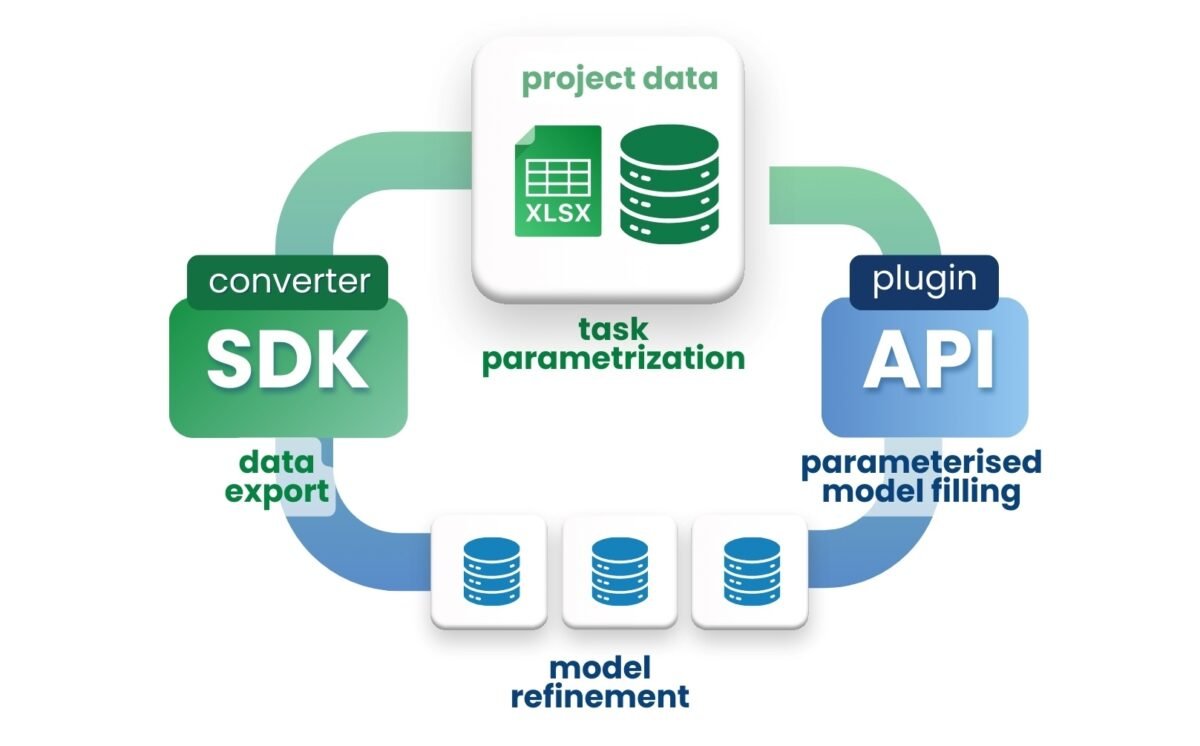
Рисунок 5
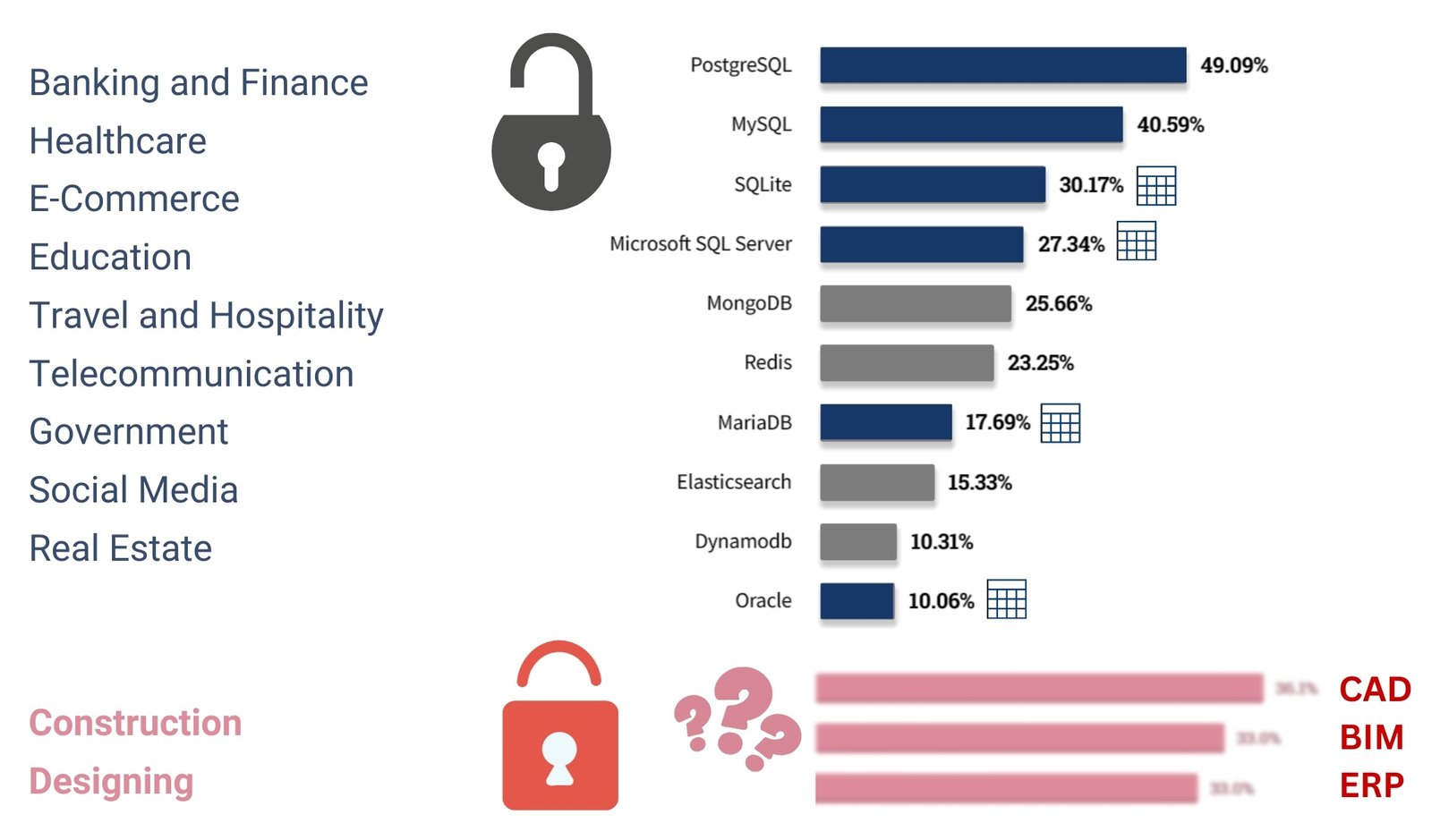
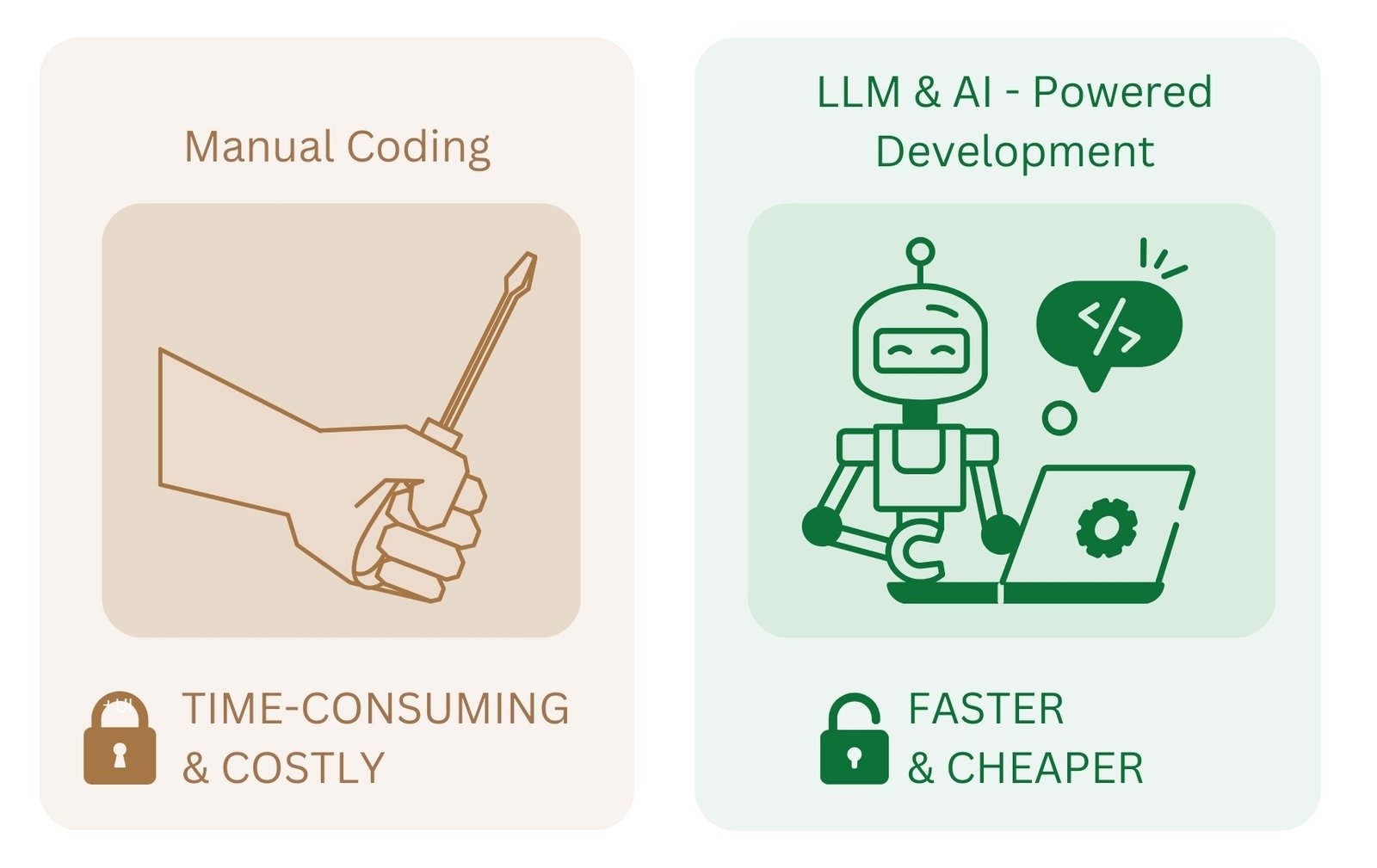
110 Emergence of LLM in design CAD data processing processes
10 June 2025
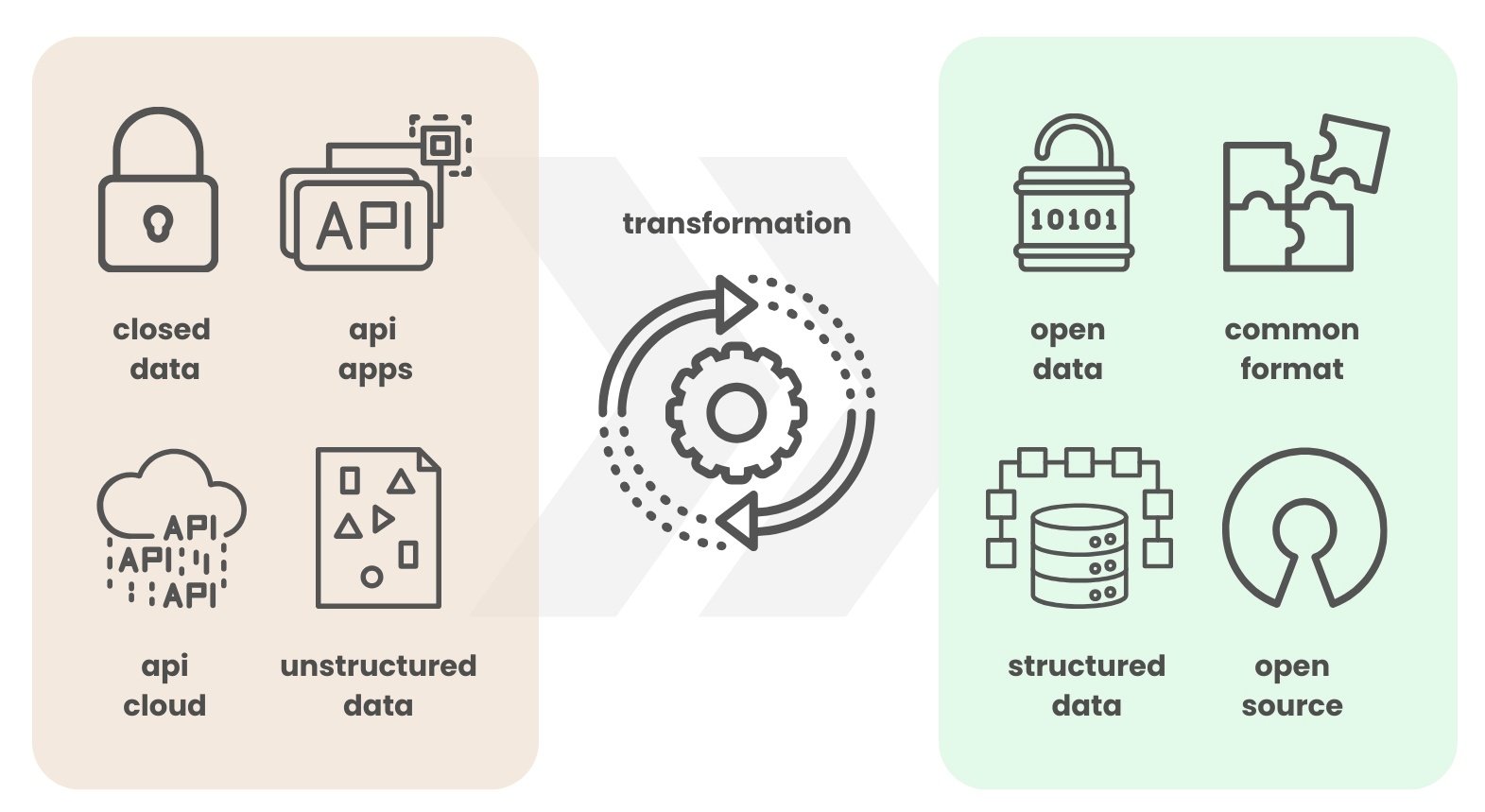
112 Next steps moving from closed formats to open data
10 June 2025

111 Automated analysis of DWG -files with LLM and Pandas

The process of data processing from DWG -files due to the unstructured nature of the information – has always been a complex task, requiring specialized software and often manual analysis. However, with the development of artificial intelligence and LLM tools, it has become possible to automate many stages of this, today, mostly manual process. Consider a real Pipeline of requests to LLM (in this example ChatGPT) to work with DWG drawings, which allow you to work with the project:

  • Filter DWG data by layer, ID and coordinates
  • Visualize the geometry of the elements
  • Automatically annotate drawings based on parameters
  • Expand wall polylines to the horizontal plane
  • Create interactive 3D -visualizations of planar data
  • Structure and analyze construction data without complex CAD -tools

In our case, the process of building Pipeline starts with sequential code generation through the LLM. First, a query describing the task is generated. ChatGPT generates Python -code, which is executed and analyzed, showing the result inside the chat room. If the result is not as expected, the request is corrected and the process is repeated

Pipeline is a sequence of automated steps performed to process and analyze data. In such a process, each step takes data as input, performs transformations, and passes the result to the next step.

After obtaining the desired result, the code is copied from LLM and pasted into the code in the form of blocks in any of the convenient IDEs, in our case on the Kaggle platform.com. The resulting code fragments are combined into a single Pipeline, which automates the entire process – from data loading to its final analysis. This approach allows rapid development and scaling of analytical processes without deep programming expertise. The full code of all the fragments below, along with sample queries, can be found on the Kaggle.com platform by searching for “DWG Analyse with ChatGPT | DataDrivenConstruction” (А. Boiko, “DWG Analyse with ChatGPT | DataDrivenConstruction,” 5 Mar 2024).

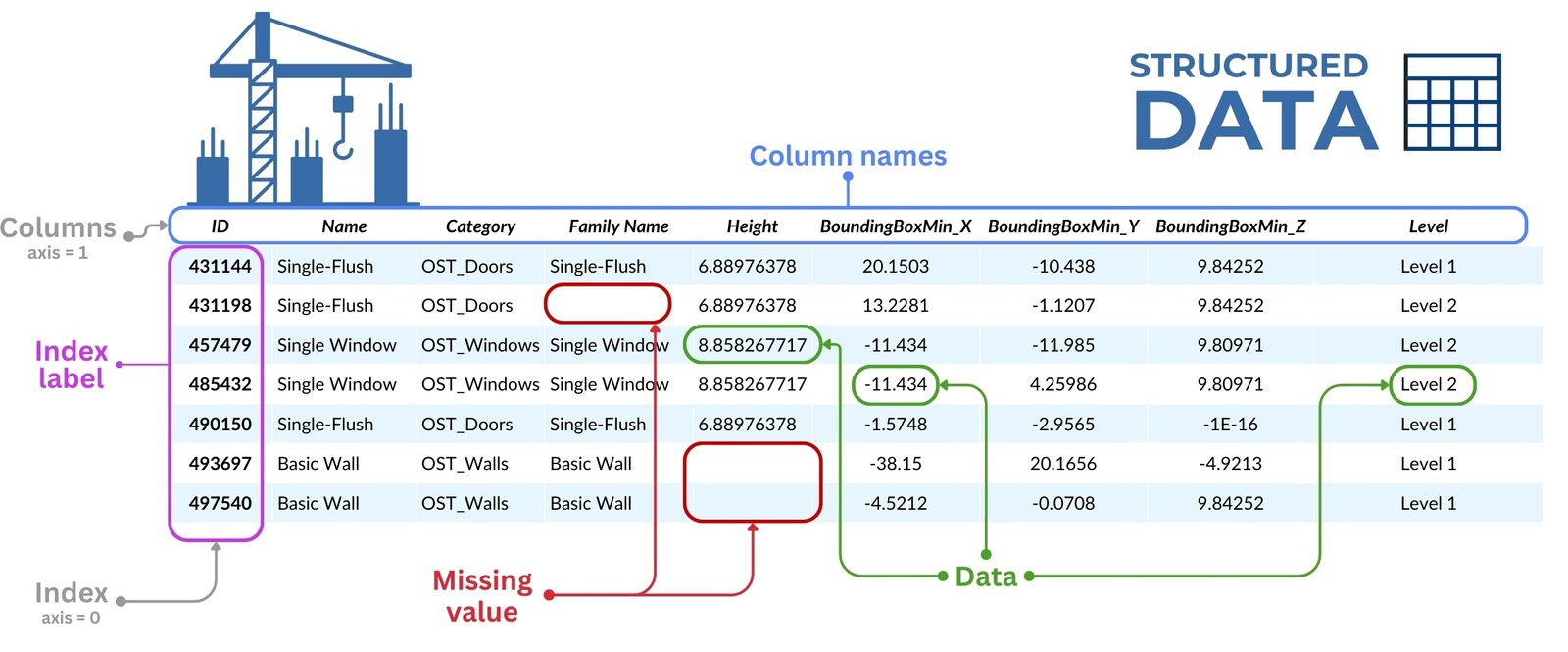
Let’s start the process of working with DWG data, after conversion to structured view (Fig. 4.1-13), with a classical step – grouping and filtering of all the drawing data, necessary for our task wall elements, specifically polylines (parameter ‘ParentID’ allows to group lines into groups), which in the parameter (dataframe column) “Layer” has a string value containing the following combination of letters (RegEx) – “wall”.

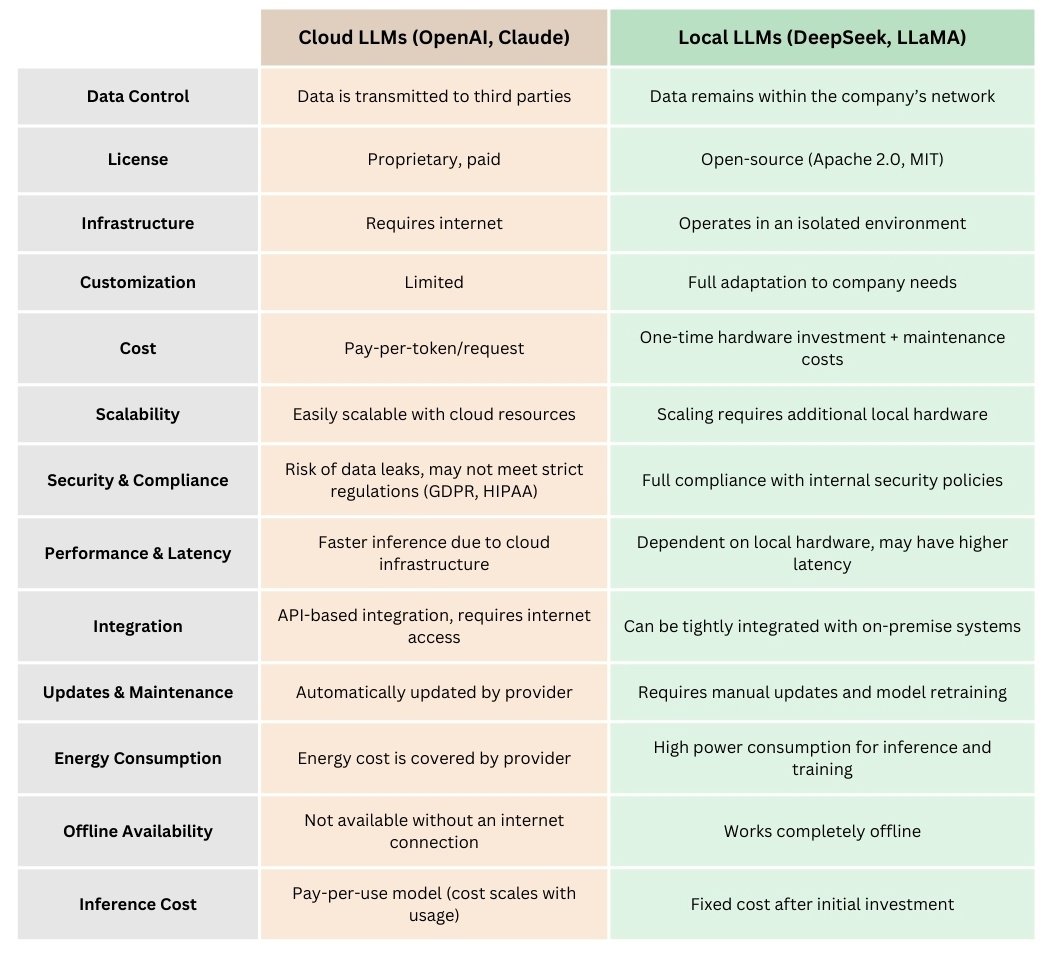
  • To get the code for a similar task and the result in the form of a picture you should write the following query in LLM:

    First, check if the dataframe obtained from DWG contains the defined columns: ‘Layer’, ‘ID’, ‘ParentID’ and ‘Point’. Then filter out the IDs from the ‘Layer’ column that contain the string ‘wall’. Find the items in the ‘ParentID’ column that match these identifiers. Define a function to clean and split the data in the ‘Point’ column. This includes removing brackets and splitting the values into ‘x’, ‘y’ and ‘z’ coordinates. Plot the data using matplotlib. For each unique ‘ParentID’, draw a separate polyline connecting the ‘Point’ coordinates. Make sure the first and last points are connected if possible. Set the appropriate labels and headers, ensuring that the x and y axes are equally scaled.

  • The answer LLM will give you a ready-made picture behind which hides the Python code that generated it:
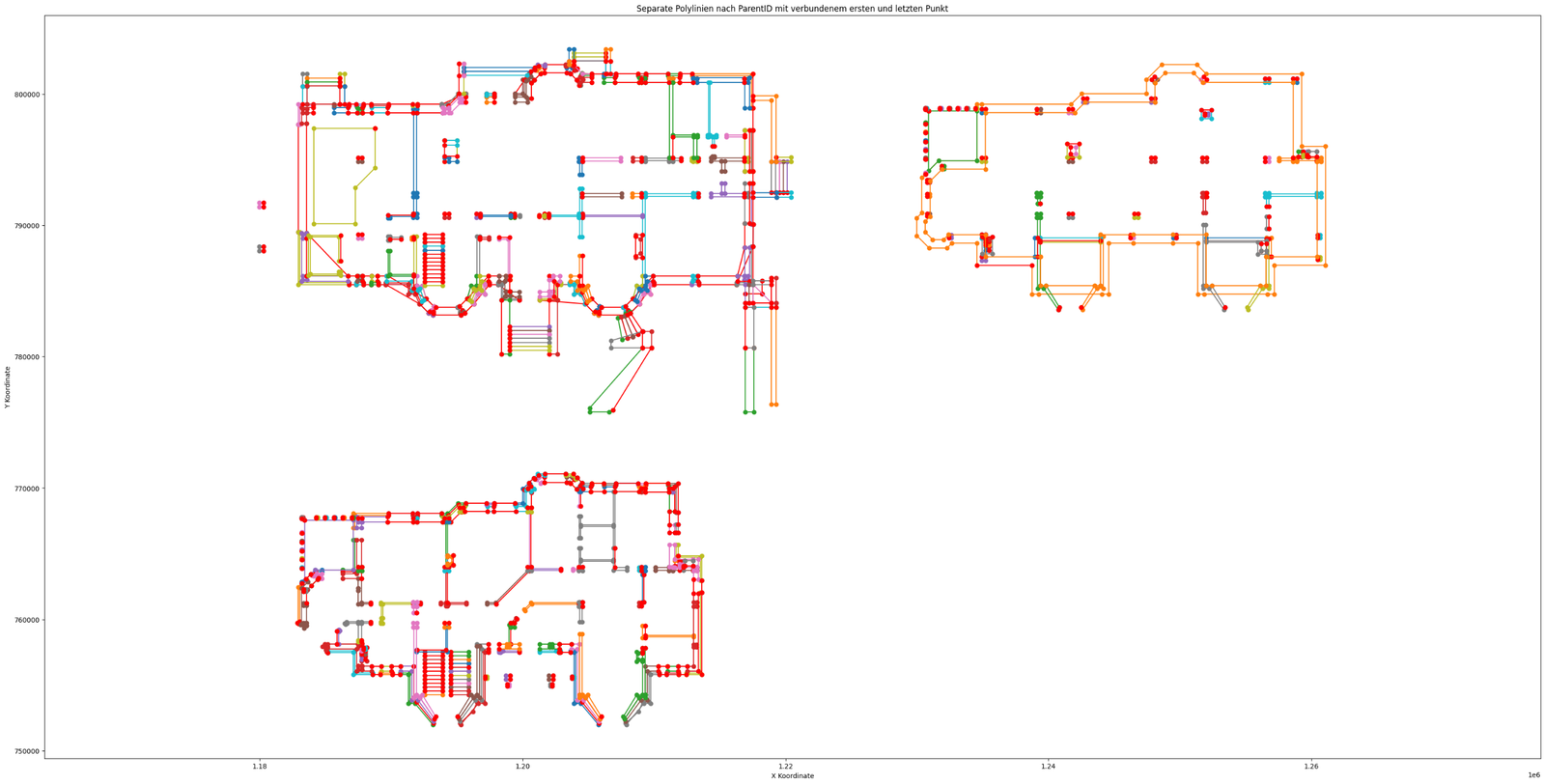
Рисунок 1
Fig. 6.4-8 LLM code extracted all the lines of the “wall” layer from the DWG -file, cleared their coordinates, and constructed the polylines using one of the Python libraries.
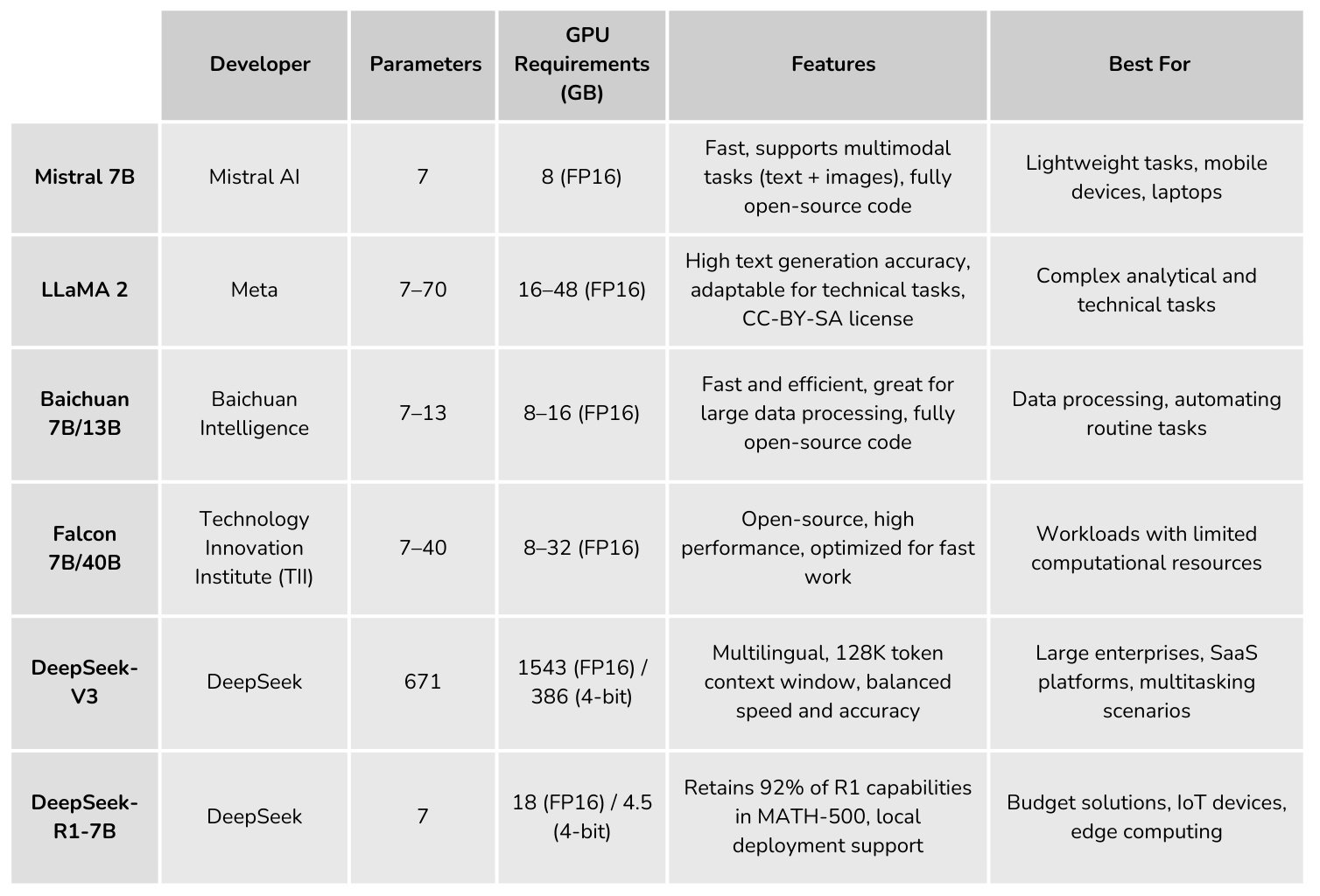
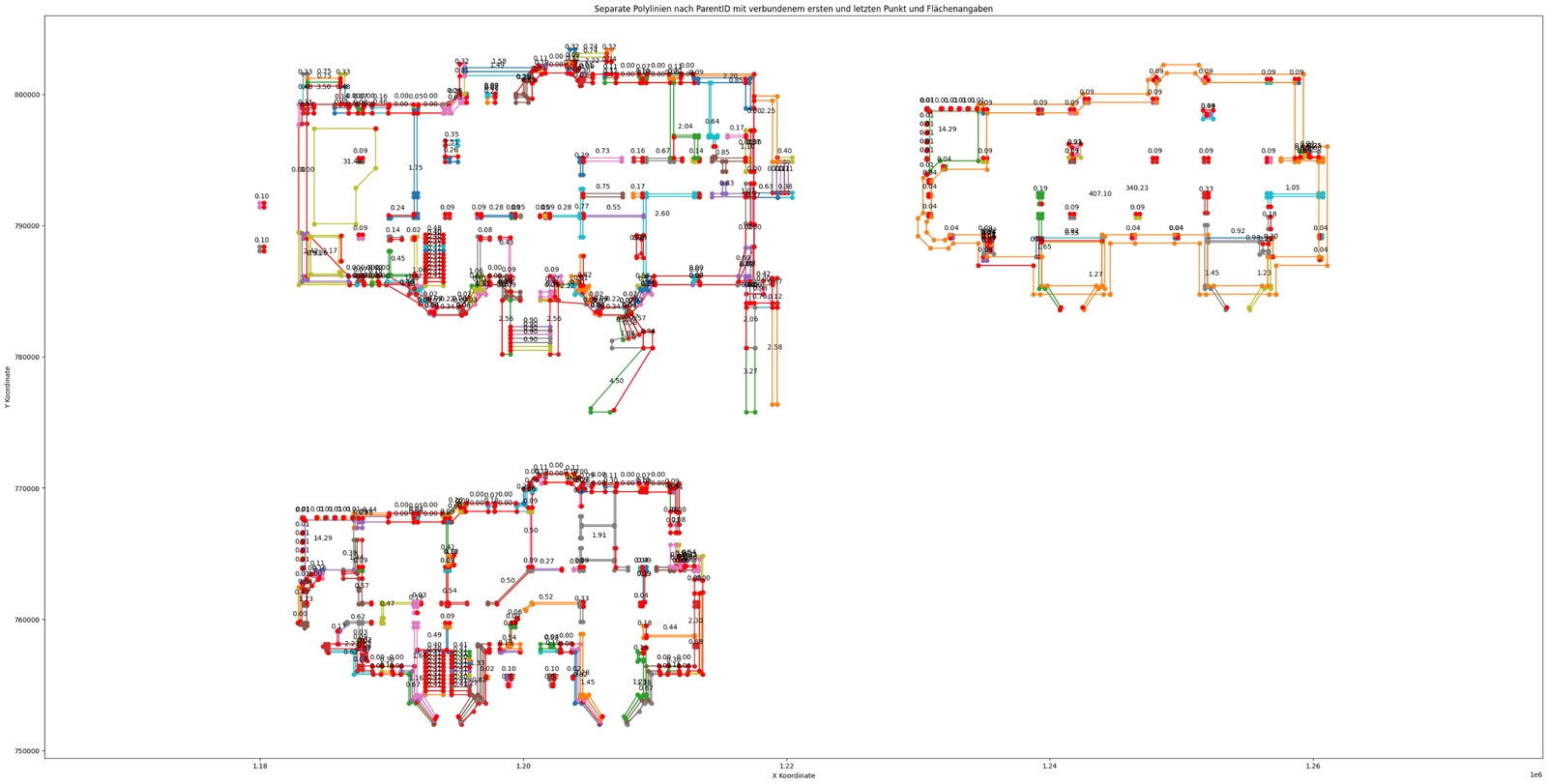
  • Now let’s add to the lines the area parameter that each polyline has in its properties (in one of the dataframe columns):

    Now get just one “ParentID” from each polyline – find that ID in the “ID” column, take the “Area” value, divide by 1,000,000 and add that value to the graph
.

.

  • The LLM response will show a new graph where each polyline will have a caption with its area:
Рисунок 2
Fig. 6.4-9 LLM has added code that takes the area values for each polyline and adds it to the image with line visualization.
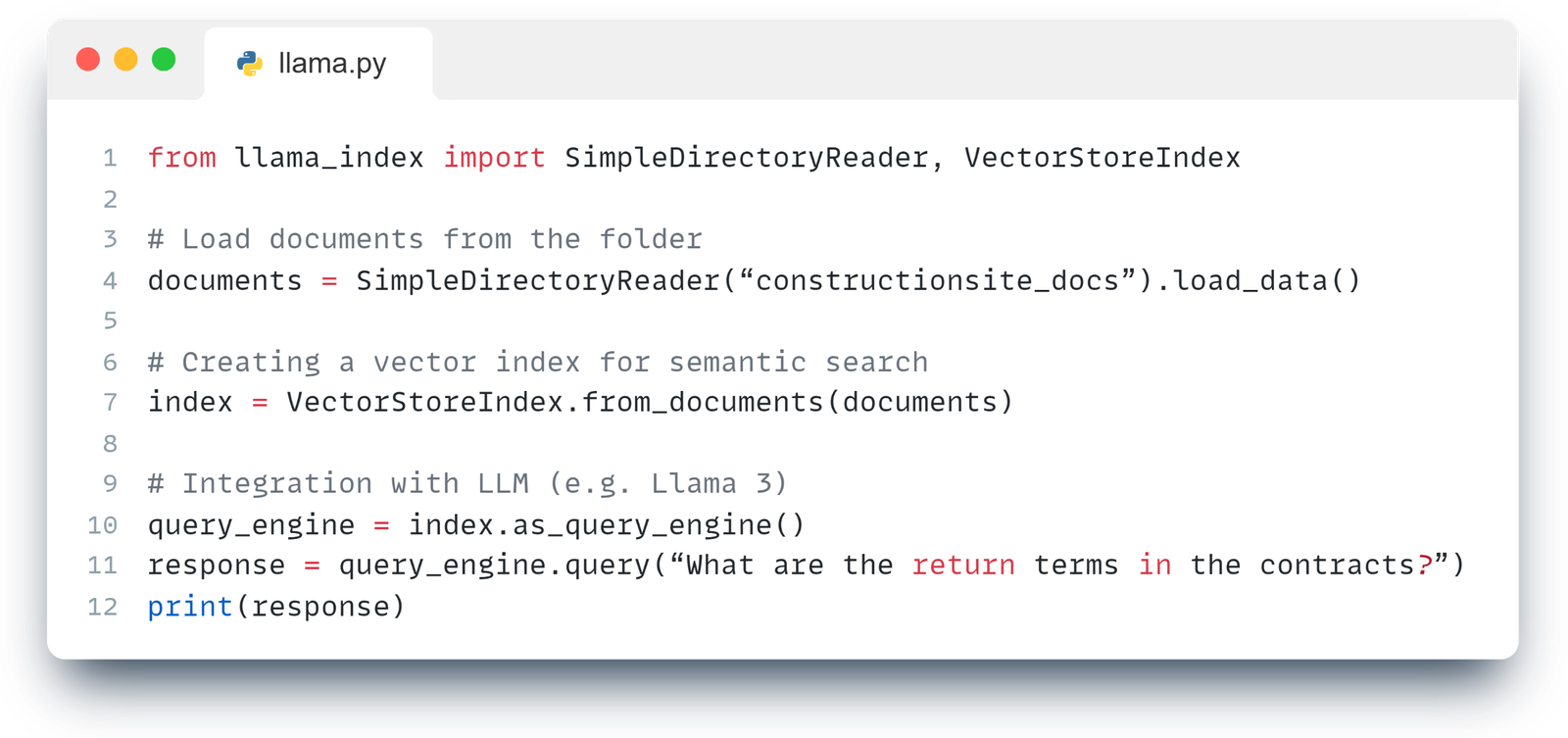
  • Then we will transform each polyline into a horizontal line, add a parallel line at a height of 3000 mm and connect them into a single plane, to show in this way the layout of the surfaces of the wall elements:

    You need to take all the elements from the “Layer” column with the value “wall”. Take these IDs as a list from the “ID” column and find these IDs from the whole dataframe in the “ParentID” column. All elements are lines that are combined into a single polyline. Each line has a different x, y geometry of the first point in the “Point” column. You must take each polyline in turn and from the point 0,0 horizontally draw the length of each segment from the polyline. the length of each segment of the polyline into one line. Then draw exactly the same lines only 3000 higher, connect all points into one plane.

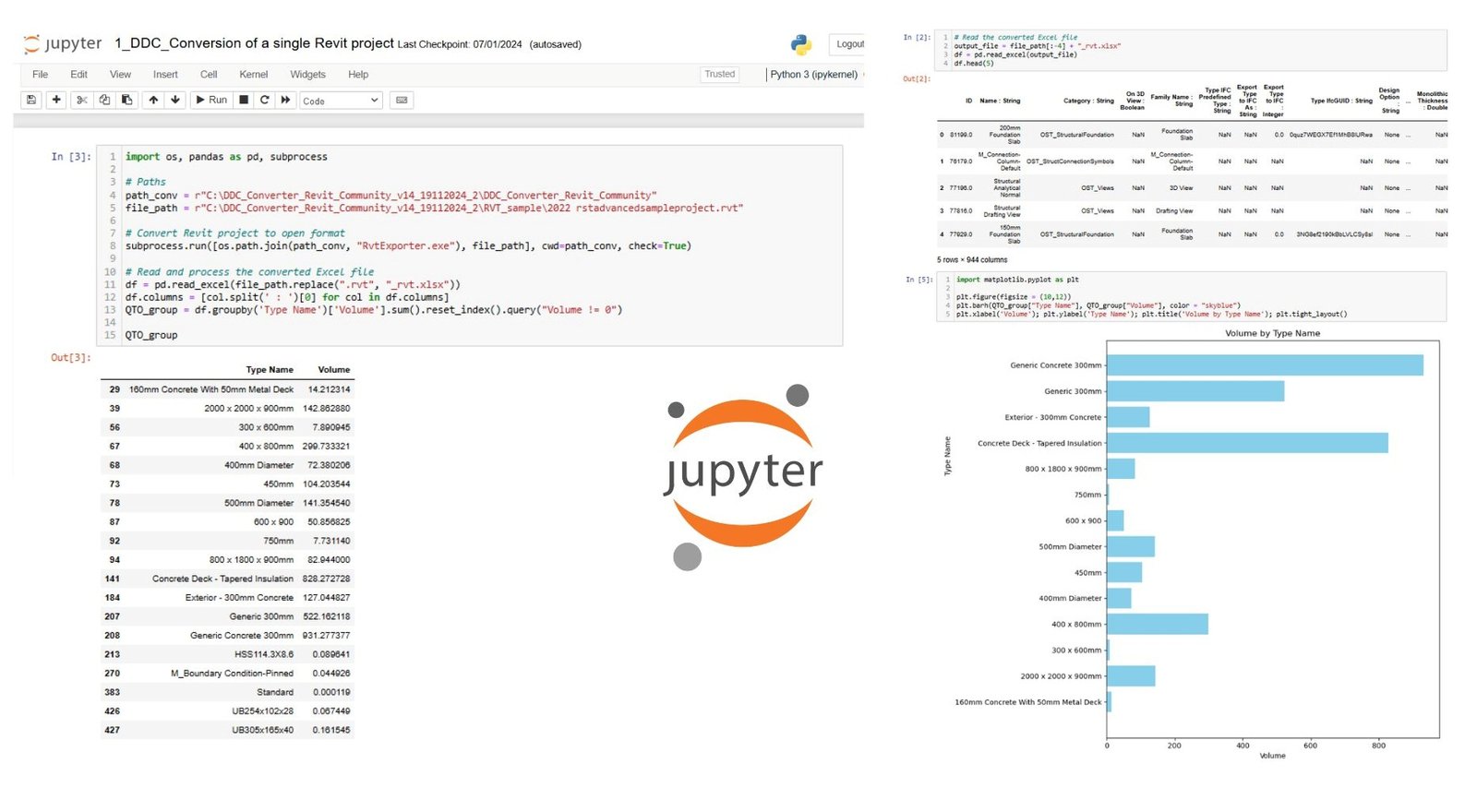
  • Now let’s move from 2D projection to 3D -model of walls from flat lines by connecting upper and lower layers of polylines:

    Visualize wall elements in 3D, connecting polylines at heights z = 0 and z = 3000 mm. To create a closed geometry representing the walls of the building. Use Matplotlib 3D graphing tool.
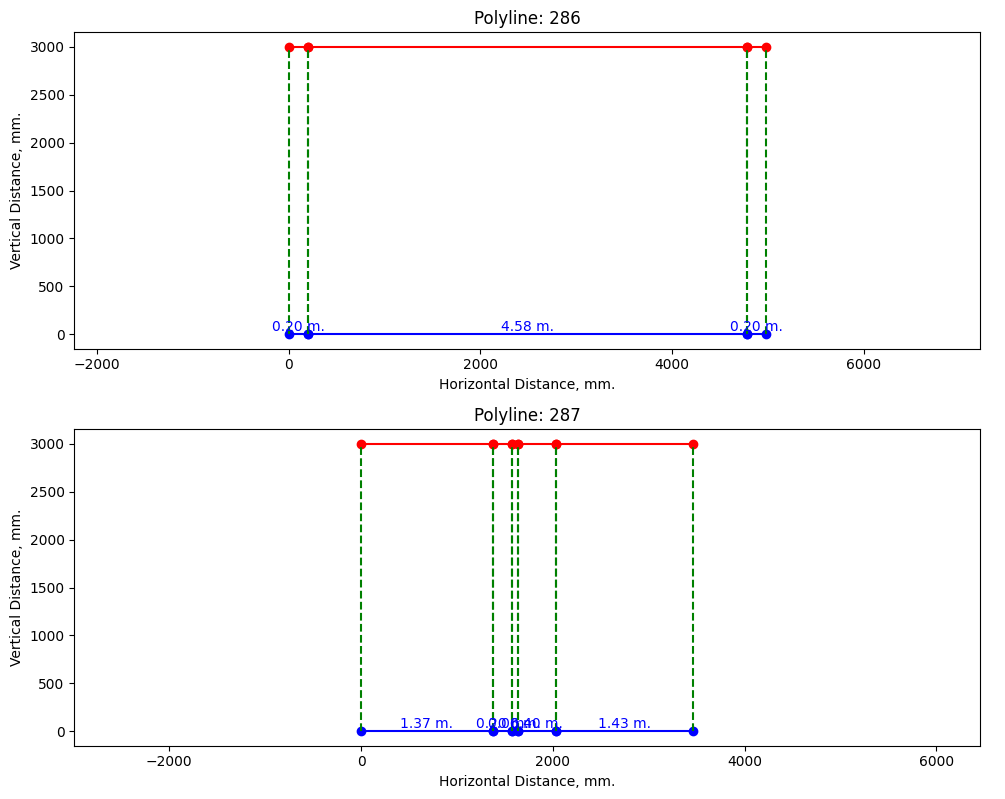
  • The LLM response will output code that allows you to plot wall drawings in the plane:
Рисунок 4
Fig. 6.4-10 We turn each polyline using prompts into a layout that visualizes the wall planes directly in the LLM chat.
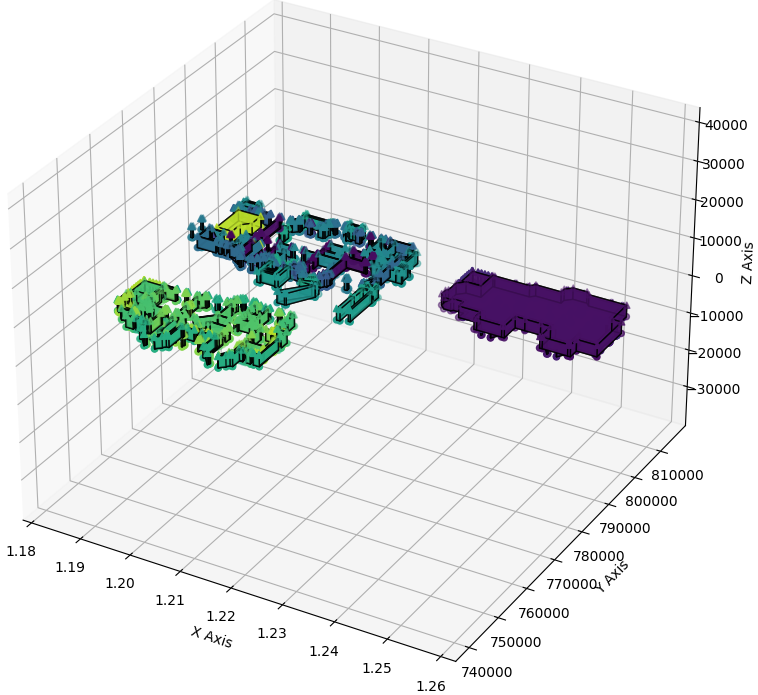
  • LLM will generate an interactive 3D -graph in which each polyline will be represented as a set of planes. The user will be able to move freely between elements with a computer mouse, exploring the model in 3D mode by copying the code from the chat to the IDE:
Рисунок 5
Fig. 6.4-11 LLM helped build code [129] to visualize flat drawing lines into a 3D view that can be explored in the 3D viewer inside the IDE.

To build a logical and reproducible Pipeline – from initial conversion and loading of DWG -file to the final result – it is recommended to copy the generated LLM -block of code to the IDE after each step. In this way, you not only check the result in chat, but also run it in your development environment immediately. This allows you to build the process sequentially, debugging and adapting it as needed.

You can find the complete Pipeline code of all fragments (Fig. 6.4-8 to Fig. 6.4-11) along with sample queries on the Kaggle platform.com by searching for “DWG Analyze with ChatGPT | DataDrivenConstruction” (А. Boiko, “DWG Analyse with ChatGPT | DataDrivenConstruction,” 5 Mar 2024).On Kaggle you can not only view the code and the prompts used, but also copy and test the entire Pipeline with the original DWG dataframes in the cloud for free without having to install any additional software or the IDE itself.

The approach presented in this chapter allows you to fully automate the checking, processing and generation of documents based on DWG -projects. The developed Pipeline is suitable both for processing individual drawings and for batch processing of dozens, hundreds and thousands of DWG-files with automatic generation of necessary reports and visualizations for each project.

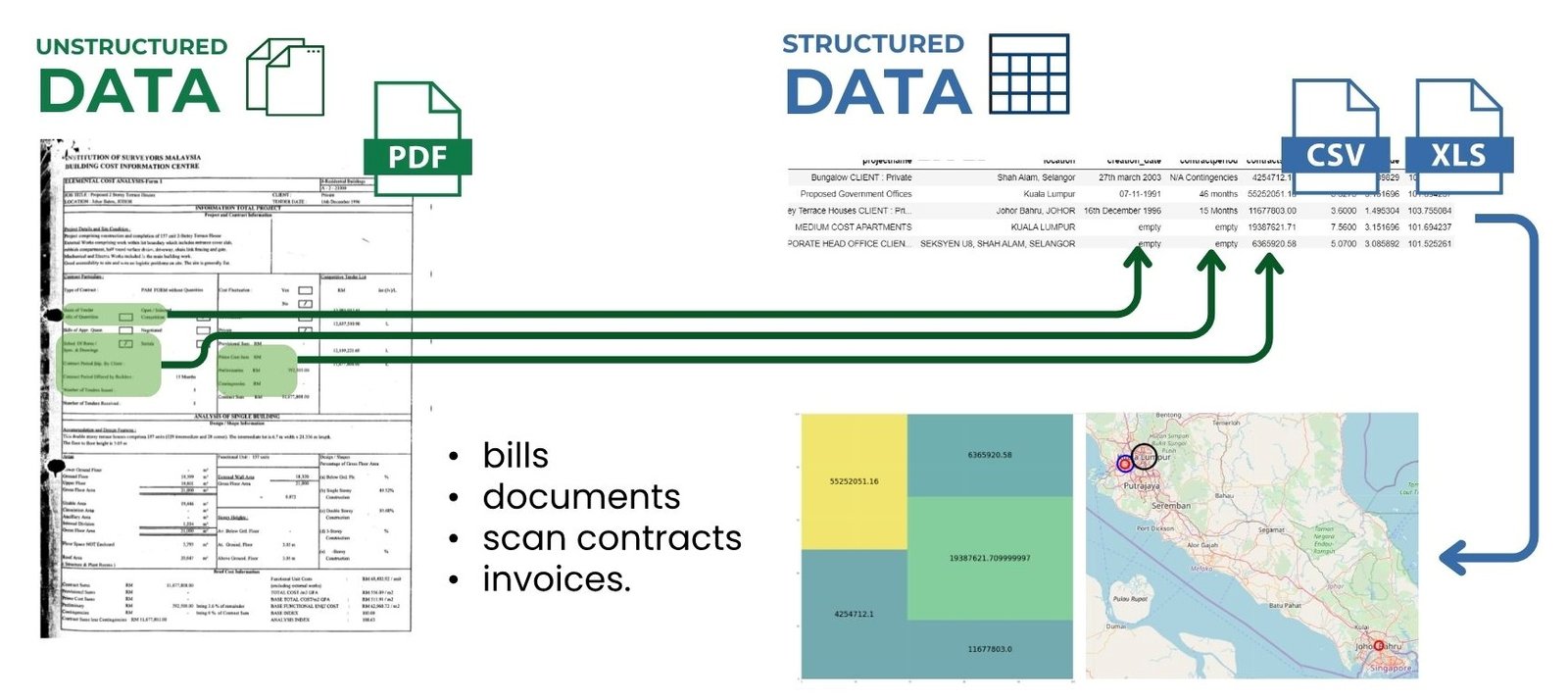
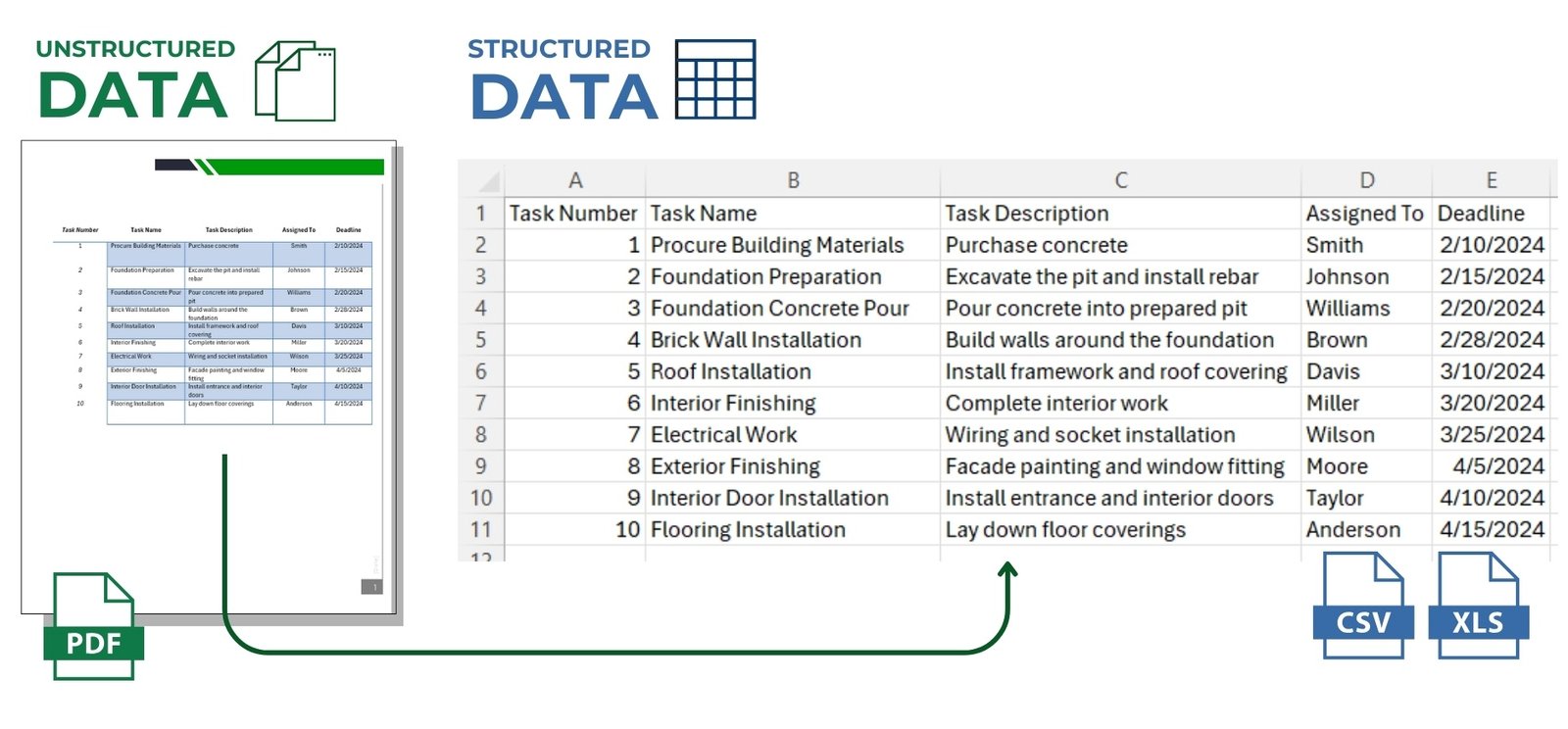
The process can be organized sequentially and transparently: first the data from CAD -file is automatically converted into XLSX format, then loaded into a dataframe, followed by grouping, checking and result generation – all this is realized in a single Jupyter notebook or Python -script, in any popular IDE. If necessary, the process can be easily extended through integration with project documentation management systems: CAD files can be automatically retrieved according to specified criteria, results can be returned back to the storage system and users can be notified when the results are ready – by email or messengers.

Using LLM chats and agents to work with design data reduces dependence on specialized CAD -programs and allows you to perform analysis and visualization of architectural designs without the need for manual interaction with the interface – without mouse clicks and remembering complex menu navigation.

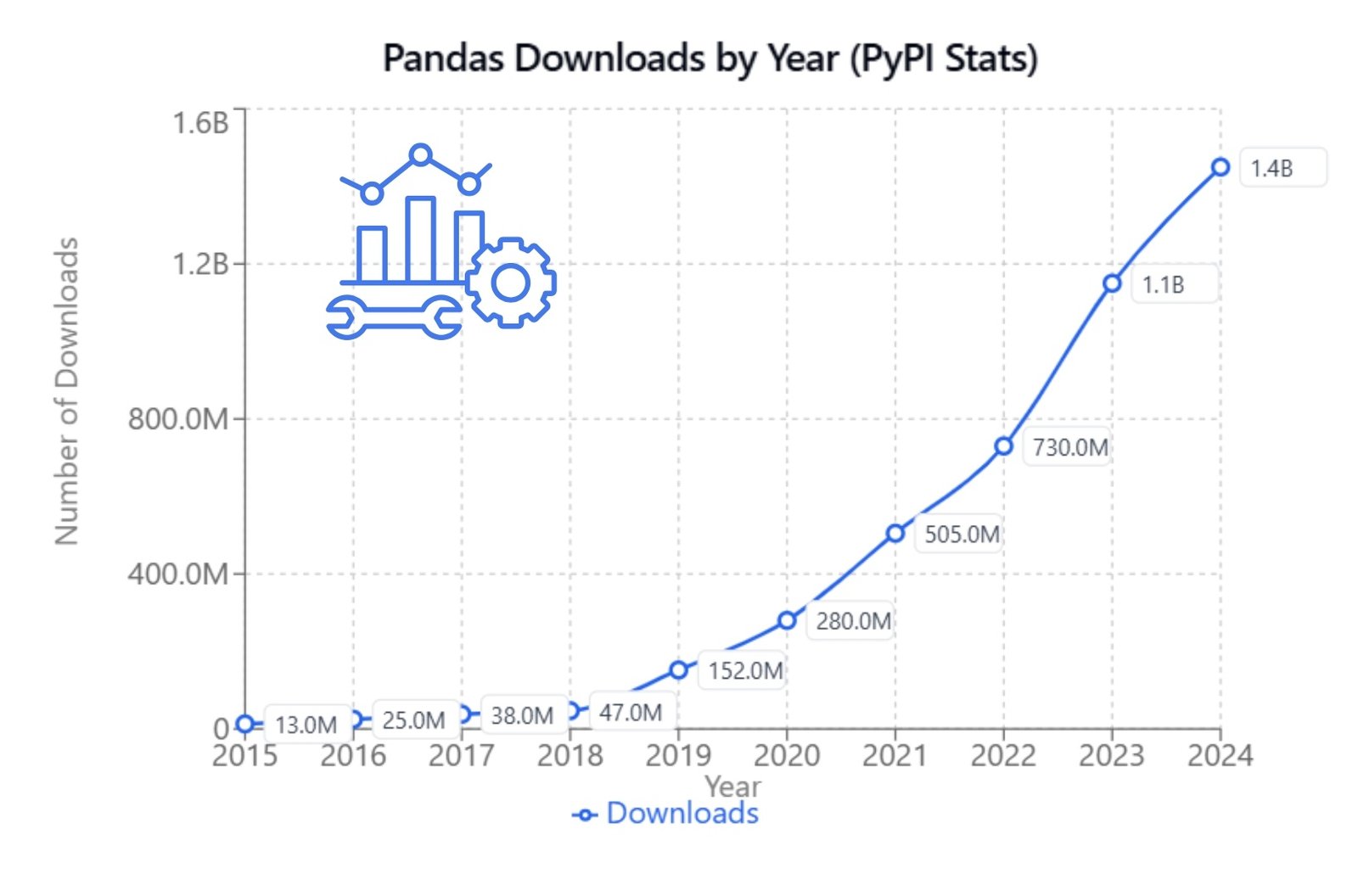
With each passing day, the construction industry will hear more and more about LLM, granular structured data, DataFrames and columnar databases. Unified two-dimensional DataFrames formed from various databases and CAD formats, will be the ideal fuel for modern analytical tools that are actively handled by specialists in other industries.

The automation process itself will be significantly simplified – instead of studying API of closed niche products and writing complex scripts to analyze or transform parameters, now it will be enough to formulate a task in the form of a set of individual text commands, which will be folded into the required Pipeline or Workflow-process for the required programming language, which runs for free on almost any device. No more waiting for new products, formats, plug-ins or updates from CAD- (BIM-) tool vendors. Engineers and builders will be empowered to work independently with data using simple, free and easy-to-understand tools, assisted by LLM chats and agents.

.

Leave a Reply

Change language

Post's Highlights

Stay updated: news and insights


We’re Here to Help

Fresh solutions are released through our social channels

UNLOCK THE POWER OF DATA
 IN CONSTRUCTION

Dive into the world of data-driven construction with this accessible guide, perfect for professionals and novices alike.
From the basics of data management to cutting-edge trends in digital transformation, this book
will be your comprehensive guide to using data in the construction industry.

Related posts 

Focus Areas

navigate
  • ALL THE CHAPTERS IN THIS PART
  • A PRACTICAL GUIDE TO IMPLEMENTING A DATA-DRIVEN APPROACH (8)
  • CLASSIFICATION AND INTEGRATION: A COMMON LANGUAGE FOR CONSTRUCTION DATA (8)
  • DATA FLOW WITHOUT MANUAL EFFORT: WHY ETL (8)
  • DATA INFRASTRUCTURE: FROM STORAGE FORMATS TO DIGITAL REPOSITORIES (8)
  • DATA UNIFICATION AND STRUCTURING (7)
  • SYSTEMATIZATION OF REQUIREMENTS AND VALIDATION OF INFORMATION (7)
  • COST CALCULATIONS AND ESTIMATES FOR CONSTRUCTION PROJECTS (6)
  • EMERGENCE OF BIM-CONCEPTS IN THE CONSTRUCTION INDUSTRY (6)
  • MACHINE LEARNING AND PREDICTIONS (6)
  • BIG DATA AND ITS ANALYSIS (5)
  • DATA ANALYTICS AND DATA-DRIVEN DECISION-MAKING (5)
  • DATA CONVERSION INTO A STRUCTURED FORM (5)
  • DESIGN PARAMETERIZATION AND USE OF LLM FOR CAD OPERATION (5)
  • GEOMETRY IN CONSTRUCTION: FROM LINES TO CUBIC METERS (5)
  • LLM AND THEIR ROLE IN DATA PROCESSING AND BUSINESS PROCESSES (5)
  • ORCHESTRATION OF ETL AND WORKFLOWS: PRACTICAL SOLUTIONS (5)
  • SURVIVAL STRATEGIES: BUILDING COMPETITIVE ADVANTAGE (5)
  • 4D-6D and Calculation of Carbon Dioxide Emissions (4)
  • CONSTRUCTION ERP AND PMIS SYSTEMS (4)
  • COST AND SCHEDULE FORECASTING USING MACHINE LEARNING (4)
  • DATA WAREHOUSE MANAGEMENT AND CHAOS PREVENTION (4)
  • EVOLUTION OF DATA USE IN THE CONSTRUCTION INDUSTRY (4)
  • IDE WITH LLM SUPPORT AND FUTURE PROGRAMMING CHANGES (4)
  • QUANTITY TAKE-OFF AND AUTOMATIC CREATION OF ESTIMATES AND SCHEDULES (4)
  • THE DIGITAL REVOLUTION AND THE EXPLOSION OF DATA (4)
  • Uncategorized (4)
  • CLOSED PROJECT FORMATS AND INTEROPERABILITY ISSUES (3)
  • MANAGEMENT SYSTEMS IN CONSTRUCTION (3)
  • AUTOMATIC ETL CONVEYOR (PIPELINE) (2)

Search

Search

057 Speed of decision making depends on data quality

Today’s design data architecture is undergoing fundamental changes. The industry is moving away from bulky, isolated models and closed formats towards more flexible, machine-readable structures focused on analytics, integration and process automation. However, the transition...
060 A common language of construction the role of classifiers in digital transformation

In the context of digitalization and automation of inspection and processing processes, a special role is played by classification systems elements – a kind of “digital dictionaries” that ensure uniformity in the description and parameterization...

061 Masterformat, OmniClass, Uniclass and CoClass the evolution of classification systems

Historically, construction element and work classifiers have evolved in three generations, each reflecting the level of available technology and the current needs of the industry in a particular time period (Fig. 4.2-8): First generation (early...

Don't miss the new solutions


Linux

macOS

Looking for the Linux or MAC version? Send us a quick message using the button below, and we’ll guide you through the process!


📥 Download OnePager

Welcome to DataDrivenConstruction—where data meets innovation in the construction industry. Our One-Pager offers a concise overview of how our data-driven solutions can transform your projects, enhance efficiency, and drive sustainable growth. 

🚀 Welcome to the future of data in construction!

You're taking your first step into the world of open data, working with normalized, structured data—the foundation of data analytics and modern automation tools.

By downloading, you agree to the DataDrivenConstruction terms of use 

Stay ahead with the latest updates on converters, tools, AI, LLM
and data analytics in construction — Subscribe now!

🚀 Welcome to the future of data in construction!

You're taking your first step into the world of open data, working with normalized, structured data—the foundation of data analytics and modern automation tools.

By downloading, you agree to the DataDrivenConstruction terms of use 

Stay ahead with the latest updates on converters, tools, AI, LLM
and data analytics in construction — Subscribe now!

🚀 Welcome to the future of data in construction!

You're taking your first step into the world of open data, working with normalized, structured data—the foundation of data analytics and modern automation tools.

By downloading, you agree to the DataDrivenConstruction terms of use 

Stay ahead with the latest updates on converters, tools, AI, LLM
and data analytics in construction — Subscribe now!

🚀 Welcome to the future of data in construction!

You're taking your first step into the world of open data, working with normalized, structured data—the foundation of data analytics and modern automation tools.

By downloading, you agree to the DataDrivenConstruction terms of use 

Stay ahead with the latest updates on converters, tools, AI, LLM
and data analytics in construction — Subscribe now!

🚀 Welcome to the future of data in construction!

You're taking your first step into the world of open data, working with normalized, structured data—the foundation of data analytics and modern automation tools.

By downloading, you agree to the DDC terms of use 

🚀 Welcome to the future of data in construction!

You're taking your first step into the world of open data, working with normalized, structured data—the foundation of data analytics and modern automation tools.

By downloading, you agree to the DataDrivenConstruction terms of use 

Stay ahead with the latest updates on converters, tools, AI, LLM
and data analytics in construction — Subscribe now!

DataDrivenConstruction offers workshops tested and practiced on global leaders in the construction industry to help your team navigate and leverage the power of data and artificial intelligence in your company's decision making.

Reserve your spot now to rethink your
approach to decision making!


🚀 Welcome to the future of data in construction!

By downloading, you agree to the DataDrivenConstruction terms of use 

Stay ahead with the latest updates on converters, tools, AI, LLM
and data analytics in construction — Subscribe now!

Have a question or need more information? Reach out to us directly!
Schedule a time to discuss your needs with our team.
Tailored sessions to help your team grow — let's plan together!
Have you attended one of our workshops, read our book, or used our solutions? Share your thoughts with us!
Name
Data Maturity Diagnostics

🧰 Data-Driven Readiness Check

This short assessment will help you identify your company's data management pain points and offer solutions to improve project efficiency. It takes only 1–2 minutes to complete and you will receive personalized recommendations tailored to your needs.

Clean & Organized Data

Theoretical Chapters:

Practical Chapters:

What You'll Find on
DDC Solutions:

  • CAD/BIM to spreadsheet/database converters (Revit, AutoCAD, IFC, Microstation)
  • Ready-to-deploy n8n workflows for construction processes
  • ETL pipelines for data synchronization between systems
  • Customizable Python scripts for repetitive tasks
  • Intelligent data validation and error detection
  • Real-time dashboard connectors
  • Automated reporting systems

Connect Everything

Theoretical Chapters:

Practical Chapters:

What You'll Find on
DDC Solutions:

  • CAD/BIM to spreadsheet/database converters (Revit, AutoCAD, IFC, Microstation)
  • Ready-to-deploy n8n workflows for construction processes
  • ETL pipelines for data synchronization between systems
  • Customizable Python scripts for repetitive tasks
  • Intelligent data validation and error detection
  • Real-time dashboard connectors
  • Automated reporting systems

Add AI & LLM Brain

Theoretical Chapters:

Practical Chapters:

What You'll Find on
DDC Solutions:

  • CAD/BIM to spreadsheet/database converters (Revit, AutoCAD, IFC, Microstation)
  • Ready-to-deploy n8n workflows for construction processes
  • ETL pipelines for data synchronization between systems
  • Customizable Python scripts for repetitive tasks
  • Intelligent data validation and error detection
  • Real-time dashboard connectors
  • Automated reporting systems
111 Automated analysis of DWG -files with LLM and Pandas
This website uses cookies to improve your experience. By using this website you agree to our Data Protection Policy.
Read more
×